Apache NiFi and the Manufacturing Mindset: Why Data Needs Traceability
When I first started working with Apache NiFi, I saw it simply as a practical integration tool. A way to move data between systems: connect an API, transform some JSON, write to a database, send a notification. Useful, but straightforward.
But the more I used it, the more I realized my appreciation for NiFi ran deeper. It reminded me of something I knew long before moving into IT.
A manufacturing line.
A product is more than just an output
In manufacturing, it’s never enough to just know: "We produced 10,000 units today."
To run a reliable production line, you need traceability:
- — Where did the raw material come from?
- — Which machine processed it, and who was the operator?
- — What were the exact calibration parameters?
- — Where did the quality check happen?
If a product fails in the field, you must be able to trace its entire lifecycle back to the factory floor. In many physical industries, this isn't a premium feature—it’s a strict compliance requirement.
Data Provenance: Data has a lifecycle too
In IT, we often talk about moving data from point A to point B. But real production systems are rarely that simple. A single business event usually travels through a complex network of branching pipelines—splitting, merging, and cloning along the way.
Unlike a simple assembly line where one frame moves in a straight line, NiFi acts as a smart sorting hub. A FlowFile can be split into child files, processed through different paths, and later correlated or merged when needed. Even with this branching complexity, NiFi doesn't lose the parent-child lineage.
This way of thinking is familiar to me from quality management. When a defect appears in manufacturing, the first question is not only "what failed?" but "where did the process deviate?"
The same applies to data pipelines. When something breaks, "Did the transfer fail?" is the wrong question. You need to know: "What happened to this specific piece of data at step four?"
This is where Apache NiFi’s design differs: it doesn't just move data; it records the entire journey.
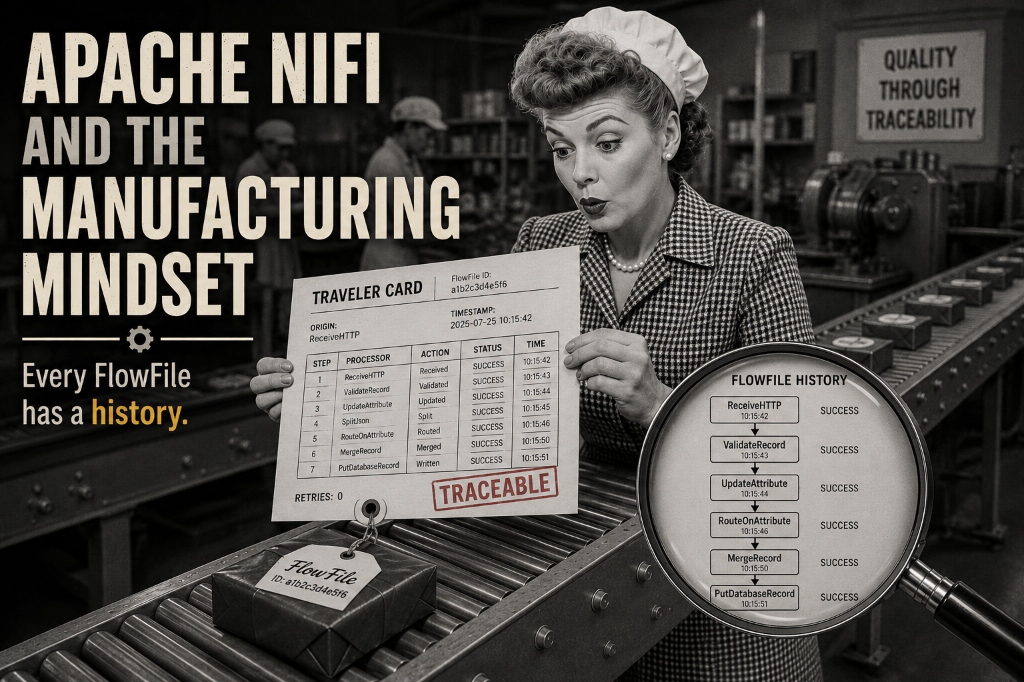
In NiFi, a FlowFile is not just a message. It has a pedigree—a complete history of where it came from and what happened to it. Through NiFi Provenance, you can see exactly where it entered the system, which processors touched it, how its attributes changed, where it failed, and how many retries it took. It is the software equivalent of manufacturing traceability.
However, this visibility is not free. In high-throughput production environments, Provenance can be extremely expensive on disk write IOPS. Without fast storage and proper disk capacity planning, your data flow can eventually slow down under the additional storage and I/O pressure created by excessive provenance retention.
Debugging should be an investigation, not archaeology
Many integration systems rely heavily on logs. When a failure happens, you start digging: which service, which server, which timestamp, which component mutated the payload? Debugging feels like archaeology.
With NiFi, the flow itself tells the story. You can follow a specific object through the visual pipeline, almost like taking a defective part off a conveyor and reading its manufacturing traveler card.
Back pressure is a physical concept
A key strength of NiFi is its built-in understanding of rate limits. A system should never produce more than the next step can handle.
Imagine a physical production line:
Machine A (100 units/hour) → Machine B (40 units/hour) → Machine C (100 units/hour)
Increasing Machine A's speed doesn’t make the factory faster; the bottleneck remains at Machine B. It only creates more unfinished inventory between operations, increasing WIP without improving throughput.
This is a core Lean manufacturing principle in action: do not create unnecessary Work in Progress (WIP).
In software, clogging the workspace means uncontrolled queues, exhausted resources, and eventually degraded performance. NiFi handles this through Back Pressure. If a processor slows down, the queue behind it fills up, automatically slowing down the upstream steps. The system protects itself from overloading.
But there is a catch. This works perfectly for pull-based sources (like reading databases, Kafka, or directories). But if you use push-based endpoints (like webhooks or UDP listeners), backpressure will cause client timeouts or dropped packets. For push-based entries, you still need an upstream broker like Kafka to act as a warehouse buffer before the conveyor.
The trap of doing everything in NiFi
Of course, every powerful tool is a temptation. Because NiFi makes it easy to build flows, it's easy to build monsters.
You can technically build a flow with 500 processors containing all your complex business logic. But your maintainability will suffer.
The same thing happens in manufacturing when you force one machine to do ten different jobs. A clean production line separates responsibilities.
The same principle applies to software architecture. Slow external dependencies are another common source of hidden bottlenecks. Decoupling through asynchronous patterns and message brokers can help keep the flow resilient.
Understanding is reliability
After years of managing systems, I’ve realized that reliability is as much about understanding as it is about uptime. When something fails, can we quickly explain what happened, why, and how to fix it?
We use Git for code history, ITSM for incident history, and monitoring for behavior history. Apache NiFi gives us the history of the data itself.
Every architectural choice has a price. Total traceability requires faster storage, careful pipeline design, and proper disk capacity planning. But if your system cannot afford to lose track of a single transaction or event, this is a price worth paying. And for that specific requirement, Apache NiFi remains a well-suited option.
A process should be visible. A flow should be understandable. A problem should be traceable.
Whether it’s a washing machine moving down a conveyor or a FlowFile moving through a pipeline, the engineering question remains the same: "What happened to this object during its journey?"