Seeing Your Infrastructure Differently: Why I Added CrowdSec Alongside Fail2Ban
For years my infrastructure was protected by Fail2Ban. It worked well: SSH was protected, mail services were protected, and several applications had their own jails.
I had no reason to replace it.
The problem appeared gradually as the infrastructure evolved.
Today one Nginx gateway routes traffic to around twenty public services: GLPI, monitoring systems, APIs, business applications and several internal services published through a reverse proxy.
At that point I realized I wasn't managing one web application anymore. I was protecting an entire platform.
The challenge was no longer blocking individual IP addresses. The challenge became understanding what was happening across the whole HTTP layer.
That was the reason I started looking for something to complement Fail2Ban—not replace it.
Why Fail2Ban Became Difficult to Scale
Fail2Ban is excellent for services with predictable authentication logs: SSH, Postfix, Dovecot, OpenVPN. These services generate very specific log entries that are easy to match with regular expressions.
HTTP applications are different. Every application exposes different endpoints, every framework returns different status codes, authentication works differently, and plugins introduce their own URLs. Some applications use AJAX extensively, others expose REST APIs. Some return HTTP 403, others always return HTTP 200 with an error message inside the response.
As more services appeared behind the same reverse proxy, the number of custom jails and regular expressions continued to grow. Maintaining them started consuming more effort than I expected.
More importantly, each jail represented an isolated detection rule. There was no shared behavioural view of activity across the gateway.
Looking Beyond Log Matching
I wasn't looking for another regular-expression engine. I wanted something capable of understanding HTTP behaviour.
The distinction is important. Fail2Ban answers a simple question: Should this IP be banned?
CrowdSec tries to answer a different one: Does this sequence of requests match an attack scenario?
Instead of matching individual log lines, it correlates multiple requests over time and evaluates them against behavioural scenarios. That small architectural difference changes the way you investigate attacks.
CrowdSec Architecture
One common misconception is that CrowdSec blocks traffic by itself. It doesn't. CrowdSec is built from several independent components:
                 Nginx Access Logs
                         │
                         ▼
                  CrowdSec Agent
      Parsers → Enrichment → Detection Scenarios
                         │
                         ▼
                 Local API (LAPI)
                         │
               Firewall Bouncer
              (iptables / nftables)
                         │
                         ▼
                 Incoming traffic blocked
Each component has a single responsibility. The Agent reads logs and applies parsers. Scenarios detect suspicious behaviour. The resulting decisions are stored in the Local API (LAPI). Finally, a Bouncer enforces those decisions.
In this configuration, using a firewall bouncer means the block happens at the network layer (iptables) before the malicious request can even reach Nginx for the second time. Other setups might use Nginx Lua bouncers to block traffic at the application proxy layer. This separation makes the architecture flexible; the detection engine doesn't care how traffic is blocked.
The Feature That Makes CrowdSec Different
Behavioural detection is only one part of the story. The feature that attracted me most is the Community Blocklist.
Every CrowdSec instance can anonymously contribute attack decisions to the community. After validation, this data becomes part of a global system for collaborative reputation and threat intelligence.
The result is surprisingly powerful. Some IP addresses are blocked on my gateway before they ever interact with my infrastructure. In other words, my server benefits from attacks already observed somewhere else.
Fail2Ban is intentionally local. CrowdSec adds a collaborative layer on top of local detection. For organizations that don't operate a dedicated threat intelligence platform, this provides significant value with very little operational overhead compared to full-scale threat intelligence systems.
Building Observability Around Security
Installing CrowdSec was only half of the project. The second half was visibility.
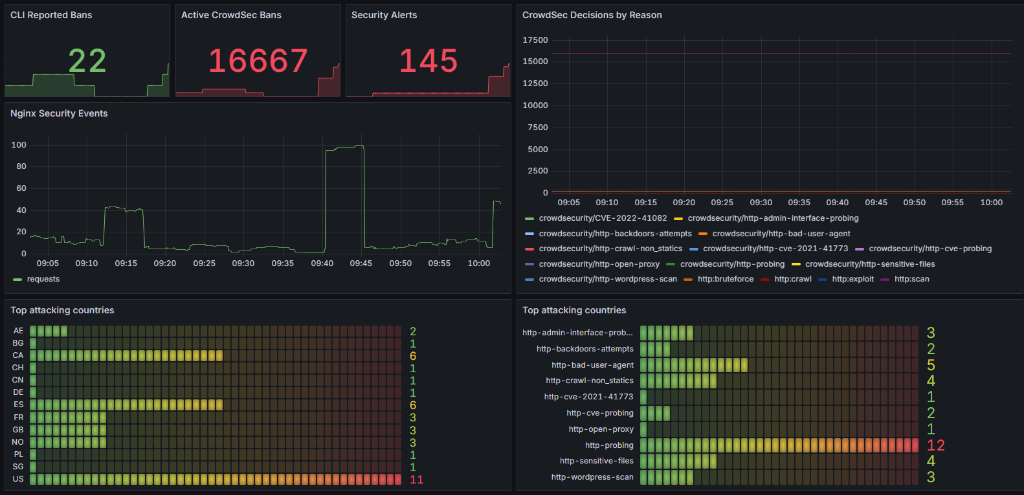
I already had Prometheus, Grafana, Loki and Node Exporter running in the infrastructure. Instead of introducing another heavy monitoring service, I wrote a small script that queries the CrowdSec Local API (LAPI) and formats active decisions into Prometheus-compatible metrics.
To run this script, I set up a systemd service triggered by a systemd timer every 60 seconds. Unlike a traditional cron job, this approach gives me clean traceability: every execution, runtime, and exit status is natively logged in journald.
The script writes these metrics directly to a `.prom` file read by the Node Exporter textfile collector:
    [ systemd.timer (60s) ]
               │
               │ (triggers)
               ▼
     [ Exporter Script ] ◄─── (queries) ─── [ CrowdSec LAPI ]
               │
               │ (writes metrics)
               ▼
   [ crowdsec_decisions.prom ]
               │
               │ (reads file)
               ▼
  [ Node Exporter (textfile) ]
               │
               │ (scrapes port 9100)
               ▼
     [ Prometheus Server ]
This allows me to monitor active decisions, attack scenarios, source countries and autonomous systems (ASN), individual banned IP addresses, and historical trends. The dashboards are no longer showing only server health. They also show what kind of hostile activity the infrastructure experiences every day.
Here is an example of what active banned threats look like in real-time via the command line interface:
──┬────────────┬──────────╮
│   ID  │  Source  │     Scope:Value    │                 Reason                │ Action │ Country │                              AS                              │ Events │ expiration │ Alert ID │
├───────┼──────────┼────────────────────┼───────────────────────────────────────┼────────┼─────────┼──────────────────────────────────────────────────────────────┼────────┼────────────┼──────────┤
│ 75138 │ crowdsec │ Ip:129.153.93.55   │ crowdsecurity/http-bad-user-agent     │ ban    │ US      │ 31898 ORACLE-BMC-31898                                       │ 2      │ 11h56m48s  │ 151      │
│ 75137 │ crowdsec │ Ip:20.205.229.184  │ crowdsecurity/http-probing            │ ban    │ SG      │ 8075 MICROSOFT-CORP-MSN-AS-BLOCK                             │ 11     │ 3h27m7s    │ 150      │
│ 75136 │ crowdsec │ Ip:23.161.169.127  │ crowdsecurity/http-crawl-non_statics  │ ban    │ GB      │ 400529 INFRALY-LLC                                           │ 49     │ 11h25m15s  │ 149      │
│ 75133 │ crowdsec │ Ip:158.158.41.78   │ crowdsecurity/http-crawl-non_statics  │ ban    │ ES      │ 8075 MICROSOFT-CORP-MSN-AS-BLOCK                             │ 48     │ 19h19m49s  │ 146      │
│ 75128 │ crowdsec │ Ip:52.165.196.84   │ crowdsecurity/http-probing            │ ban    │ US      │ 8075 MICROSOFT-CORP-MSN-AS-BLOCK                             │ 11     │ 2h37m33s   │ 141      │
An Unexpected Lesson
One afternoon CrowdSec blocked a legitimate GLPI user. At first glance, it looked like a false positive.
Instead of immediately disabling the scenario, I investigated it. Loki contained the complete HTTP request history, Grafana showed exactly when the decision had been created, and Nginx logs revealed the sequence: the user repeatedly triggered the same AJAX endpoint, generating multiple HTTP 403 responses in a very short period of time.
From CrowdSec's perspective, the behaviour was almost indistinguishable from a brute-force attempt. The detection engine wasn't wrong. My application's behaviour simply didn't match the default assumptions of the scenario.
The solution wasn't removing protection. The solution was tuning the scenario thresholds to better fit my environment. That incident reinforced an important lesson: security tools become much easier to trust when you also have good observability.
What My Dashboards Actually Showed
Another interesting observation came after several days of monitoring.
At first I thought most attacks happened during the night. That wasn't actually true. Automated scanning never stops. Bots continuously search the Internet for vulnerable applications, exposed administrative interfaces and known CVEs.
What changes during the night is something else: legitimate business traffic decreases significantly. The background noise of the Internet suddenly becomes much more visible. Without dashboards, I would probably never have noticed that distinction.
Another shift is who is doing the scanning. Years ago, background noise was dominated by residential IP blocks from specific countries. Today, the scanners reside in the heart of the modern web: AWS, Azure, Oracle Cloud, and DigitalOcean.
As you can see in the CLI output above, the banned hosts are not coming from dark corners of the web; they belong to Oracle BMC and Microsoft Corp. Attackers compromise cloud workloads or spin up short-lived virtual machines. This means you can no longer rely on simple GeoIP blocking—doing so would block the very cloud infrastructure your partners and integrations rely on.
What I Configured After the Initial Installation
The default CrowdSec installation works well out of the box. However, in a production environment, I made several critical adjustments after the initial deployment:
1. Review Ban Progression
The default remediation settings are a good starting point, but repeated malicious activity should become increasingly expensive for the source IP. I configured a progressive ban duration: first detection triggers a short temporary ban (e.g., 4 hours), repeated offenses result in exponentially longer bans, and persistent attackers get long-term blocking. The goal is to avoid wasting CPU and firewall resources on the same persistent scanners repeatedly hitting the platform.
2. Non-Binary Remediation (CAPTCHA Challenges)
CrowdSec supports different remediation approaches. Instead of directly banning suspicious sources, a first response can be a challenge mechanism, such as CAPTCHA.
A possible security workflow:
- — Normal traffic ➔ allow;
- — Suspicious behaviour ➔ require additional verification (CAPTCHA);
- — Repeated malicious behaviour ➔ temporary ban;
- — Persistent attackers ➔ long-term or permanent ban.
This approach reduces false positives while keeping protection active. For public-facing applications, especially portals with external users, this can be more practical than immediate blocking. A real user who accidentally triggers a rule gets a chance to prove they are human, while automated scanners and bots usually fail the challenge. The important idea is that security decisions do not have to be binary: allow or block.
3. Tune Scenarios for the Actual Environment
Default scenarios are designed for broad coverage. They cannot predict the quirks of your custom applications. As illustrated by the GLPI false-positive above, any endpoints using intensive AJAX, high-frequency API calls, or repeated administrative updates will eventually trigger brute-force scenarios. I adjusted the thresholds to fit my specific application traffic.
4. Separate Detection from Remediation (Simulation Mode)
I did not enable immediate blocking for all scenarios on day one. When introducing new detection rules, it is safer to run them in simulation (dry-run) mode first. This allows you to observe which scenarios trigger false positives and which IP ranges belong to legitimate users before turning on active blocking.
Why I Still Use Fail2Ban
CrowdSec didn't replace Fail2Ban in my infrastructure. It changed its role. Today the responsibilities are clearly separated:
- — Fail2Ban protects services that naturally produce authentication failures: SSH, Postfix, Dovecot.
- — CrowdSec protects the HTTP layer behind the reverse proxy.
Each tool is solving the problem it was originally designed to solve. Trying to force either one to handle everything would only increase complexity.
Where CrowdSec Fits (and Where It Doesn't)
Probably not every environment needs CrowdSec. Large enterprises often deploy commercial WAFs, SIEM platforms, dedicated threat intelligence feeds and managed security services. Those solutions provide capabilities far beyond CrowdSec, but they also require substantially larger budgets and operational effort.
For a small or medium-sized infrastructure, the trade-off is different. CrowdSec occupies an interesting middle ground. It adds behavioural analysis, community intelligence and centralized visibility without introducing excessive complexity. That balance was exactly what I was looking for.
Final Thoughts
When I started this project, I thought I was improving my firewall. Looking back, I was actually improving my observability.
The most valuable outcome wasn't blocking more IP addresses. It was understanding how my infrastructure behaves under constant background scanning, how different applications interact with security controls, and where my own assumptions about "normal behaviour" were incorrect.
CrowdSec didn't simply add another layer of protection. It gave me a much clearer picture of the infrastructure I was already running.